A Text Editor for Windows
Notepad2
While its name may correctly suggest similarities with Windows Notepad, its name is about as far as it goes. Notepad2 adds a customisable toolbar and the menus drop down far further, providing a total of over 100 options to choose from and that's not counting the various settings on any dialogues opened on some of the options. Download the program from Flo's Freeware site, although you could use the modified version I run available from PortableApps.com.
If I suggested Editor² on the basis that it had a unique feature making it easier to insert HTML tags into the content, then Notepad2 is worth exploring because it has an excellent set of tools for edits to existing text that can be most useful if, for example, you want to copy content from a brochure created in a word processor or desktop publishing program. Frequently you find that layout that works on paper needs a lot of manipulation in order to get it to fit aesthetically on everything from a phone screen to a screen in a home cinema room.
Editor Features
Insert and Auto-Complete Tags
As with some of the other editors included in this section, when you complete any opening tag, that the appropriate closing tag will appear after the cursor. Additionally, ALT-X will open a dialogue that allows you to enter a tag and attribute which, on hitting return, completes the closing tag with the cursor left between the two. Using this there's no need to complete a tag and then backspace into the opening tag to add an attribute.
Syntax Highlighting
If you're editing an HTML file all the tags, their arguments and values are all colour coded. As mentioned elsewhere, syntax highlighting is an extremely useful feature. Should you save the intended content, paste it into the default editor and, after saving the page, find it utterly corrupted it is likely to be caused by the lack of a punctuation mark somewhere in the code. This facility can be extremely helpful for locating any missing symbol before you paste the code and find the page corrupted.
Auto-Indent
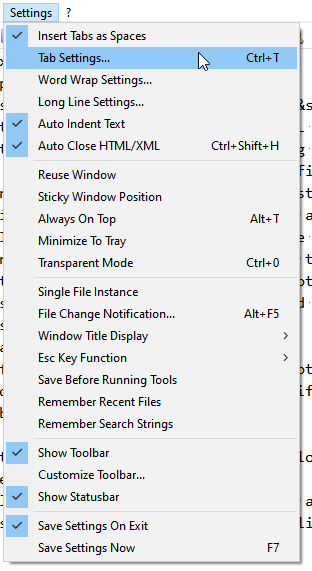
As you may have noticed from the Settings Menu image, there is an "Auto Indent" feature available. Type a carriage return, you'll get a tab as well.
Many Additional Features
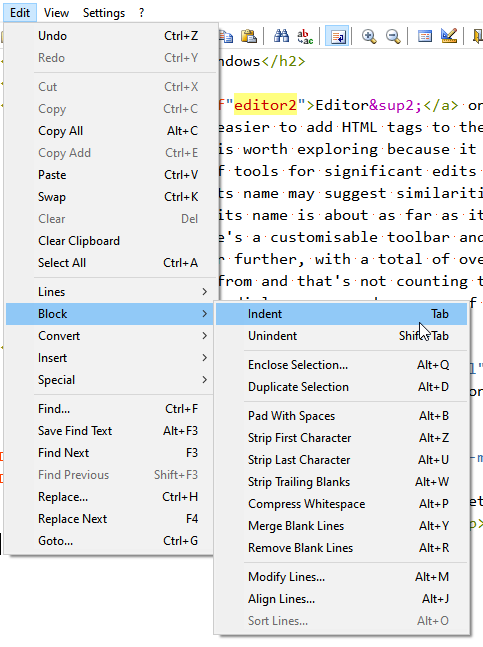
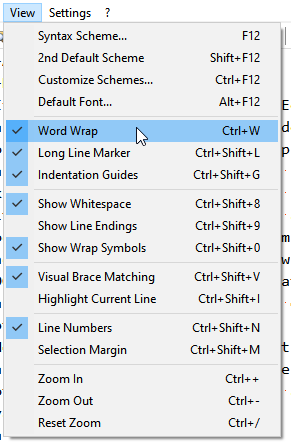
Here we see the Edit menu's "Block" option open. It is that and the four others in that section of the menu that provides the bulk of the editing power of the program. As can be seen below, the View and Settings menus offer a similar sized list of options to the Edit menu.
Related pages: Default Editor, Summernote, Monaco and External Editors.